iPhone 16 Simulator: 9 Ways to Test Apps, UI, and Features Without Owning the Device
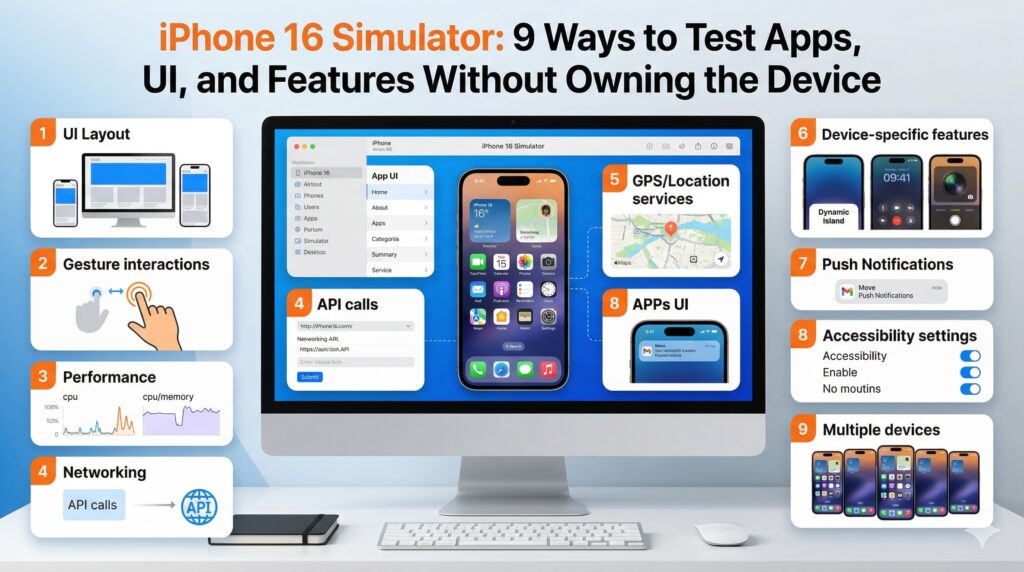
The iPhone 16 Simulator has enabled developers and QA engineers to ensure that the apps they are currently using are fully optimized for the new device from Apple without having to purchase the device immediately. As always, Apple tries to revolutionize the performance screen and iOS features, making developers struggle again to achieve compatibility smoothly.
However, testing on actual devices can be expensive and challenging for teams that have locations spread across different sites. This is where simulators come into play as a cost-effective solution. Using the iPhone 16 Simulator in cloud testing solutions enables development teams to test UI responsiveness, performance, and functionality while minimizing risk during the launch.
In this article, we will have an overview of iPhone 16 Simulator, its benefits, and Ways to Test Apps, UI, and features without owning the device. We will also discuss some best practices to follow while using the iPhone 16 Simulator.
Understanding iPhone 16 Simulator
A virtualized platform called iPhone Simulator attempts to mimic the interface and software features of an actual iPhone device. Using Xcode, iPhone developers can run virtual versions of the newest models of the iPhone from their macOS computers. The iPhone 16 Simulator replicates the following important features:
- Screen size, resolution, and safe areas
- iOS system functionality and user interface
- Touch interactions and navigation flows
- App life cycle states (foreground, background, suspended)
- Debugging logs and performance data
Though simulators are able to simulate software-related functionality accurately, they are not able to simulate hardware-related aspects such as camera sensors, Face ID, battery life, and network variations.
Benefits of Using iPhone 16 Simulator
- Lower Hardware Costs- Sourcing every new iPhone model released can be a costly affair. With the iPhone 16 Simulator, testers don’t have to purchase new hardware immediately. The new SDK is available for developers to begin validation immediately after its release. It is especially advantageous for startups and mid-scale development teams that want to keep the budget down while ensuring a solid outcome.
- Faster Iteration Cycles- Simulators provide instant build and run capabilities in Xcode. Developers can develop their code, deploy new updates, and test new features in seconds. That expedites debugging, tweaking the Ui and optimizing features, which in turn gets products into the market sooner.
- Parallel Testing for Configurations- Testers can run many device configurations and iOS versions in parallel using the simulators. Instead of having to hop from one device to another, developers can assess how their app performs on other configurations. A major improvement in coverage efficiency
- Early Access to New SDK Features- The simulator is usable as soon as Apple releases a new SDK. New frameworks, APIs, and system changes can be tested right away by developers. Even before the release of an iOS version, developers can prepare their apps for new features.
- Better Debugging Facilities- Integrated with Xcode’s debugging facilities that allow developers to control memory, CPU load, get crash reports, and thread activity. It allows developers to detect issues early and enhance the stability of their apps.
- Effective Regression Testing- Regression tests can be re-run quickly on the simulator before the final testing on the device when an update or patch is ready to be released.
- Snapshot and Reset Features- Simulators provide a quick reset feature for device states. Compared to manual hardware resets, the testing environment can be rapidly reset if an application is unstable, saving time.
- Accessibility and UI Compliance Testing- The Simulator makes it possible for testers to easily enable accessibility options, VoiceOver navigation, high contrast color schemes, and dynamic font sizes. The Simulator helps ensure that the application is functional and accessible.
- Scalable Cross-Platform Testing- Although the iPhone 16 Simulator is the best for iOS testing, most applications also support Android. By using platforms such as TestMu AI, the workflow can be extended to cloud testing on real devices and even use an online Android emulator within the same environment.
9 Ways to Test Apps, UI, and Features Without Owning the Device
- Verify Responsive UI Layouts
Utilize the simulator to check whether the layout constraints, typography, safe areas, and graphics of the UI respond perfectly to new screen sizes. Check all app components for any clips, object overlaps in the user interface, inconsistent spacing between them, or misaligned user interface components. It will also aid in assuring a refined and cohesive user interface without requiring direct access to the device.
- Test Navigation and Gesture Flows
Simulate touch gestures (swipes, taps), modal transitions, tab-based navigation & multi-touch interactions to verify the app’s response to user actions. Consider animation timing, responsiveness, and accuracy when meeting different usages. App navigation fluidity optimization can lead to enhanced usability and an intuitive user experience.
- Assess Performance Metrics
Check that the developing environment is updated. This makes sure that the simulator is running the latest version of iOS OS. On each OS level upgrade, Xcode, SDKs, and profiles can be updated periodically to the latest version of OS. It will guarantee that the problems are addressed from this early stage to avoid performance instability later on, once the app is handed over to end users.
- Simulate Network Conditions
Emulate packet loss, bandwidth throttling, sluggish connections, etc. Take note of how the application functions when there is a shaky connection or extremely slow internet. Testing the loading state, retry logic, timeout value, and whether the user sees the appropriate error message are all included. In addition to this, the simulated network environments ensure that a stable as well as an unstable network is also used during app runs.
- Run Automated Test Suites
The CI/CD pipeline is configured to periodically trigger the automated UI or functional tests, validating that at least some core functionality will always be tested. Ensuring no regressions and key workflows are broken with each code commit. So, Automated testing helps in minimizing manual work, and it provides quality assurance across builds.
- Test Location-Based Features
Test geo-fencing, trackers of deliveries, features of places where entertainment takes place, or map services within apps can be tested by approaching various GPS locations. With this, we can also test some location-based logic and edge cases without the need to be physically present at the different locations, making it a big time and resource saver.
- Accessibility and Dark Mode Functionality Validation
Switch between light mode and dark mode and verify proper use of contrast ratio for color & visual clarity. For apps with large text views, font scaling for the dynamic type size in settings needs validation. Accessibility is a key part of inclusive design, so not only does adding it improve usability, but it also expands the app’s reach.
- App Lifecycle Functionality Validation
Simulate background-to-foreground transition and foreground-to-background transitions, call and notification interruptions, and low memory notifications to demonstrate the attribute of the app’s functionality in state transitions. State transitions validation ensures consistent performance when the app is put through real-world scenarios.
- Cross-Platform Validation
For cross-platform apps, combine iOS simulator testing with cloud-based real-device validation. This helps provide for consistent UI, consistent performance whether on iOS or Android, and feature parity. Building on this approach, TestMu AI (previously known as LambdaTest) provides a proven cloud-based testing ecosystem that allows the iPhone 16 simulator to run concurrently with real Android devices as well as an Android emulator online. This enables complete cross-platform coverage without maintaining physical devices.
TestMu AI (formerly LambdaTest) is an AI testing platform for large-scale web and mobile test automation. It enables real-time parallel testing over 3000 environments (including real mobile devices and browsers) in the cloud. TestMu AI allows testers to compare visual behavior and qualitative interactions across platforms in real time. This becomes particularly valuable in identifying differences in animations, gestures, font rendering, and touch response that can affect user experience.
Furthermore, TestMu AI can be seamlessly integrated with CI/CD to automatically test every build without any human involvement. This guarantees that quality is uniform in each release; simultaneously, it aids in enhancing the feedback cycle for development teams. The solution also helps to eliminate the cost of maintaining a physical device lab, which reduces the complexity of infrastructure and operational costs for organizations. At the same time, it also enables teams to test UI, functionality, and performance on real devices in the cloud without having to invest in any hardware.
Best Practices for Using iPhone 16 Simulator
- Apply Shift-Left Testing- Shift-left testing is a testing approach that executes validation as early in the app development life cycle as possible, rather than at the end of the QA process. Types of Testing Errors can be detected early on during the coding phase by testing the app functionality on the simulator, which will keep the cost, complexity, and duration of error correction at its lowest.
- Automate Repetitive Tasks-Repetitive stages in manual testing take a lot of time and can lead to mistakes. By automating builds and validations after every code commit, CI/CD pipelines may automate simulator testing.
- Test for Edge Cases and Stress Tests- Always test the application in situations that are not ideal, so the application can behave appropriately for these conditions. It is beneficial if the application is tested at low battery, with permission issues, interrupted connection, poor connectivity, or high data usage.
- Standardize Testing Environments- A definite standard needs to be considered by all team members. It is reasonable to expect the same application running on the same device on the same OS version, language, connectivity level, and with identical device settings to produce uniform test results.
- Update SDKs and Profiles- Confirm that the development surroundings are updated. This ensures that the simulator runs the latest version of the iOS operating system. When an OS-level upgrade happens, it ensures that Xcode gives SDKs & profiles updates that can be done periodically to bring the app up-to-date with the latest version of the OS.
- Utilize Production-Like Data- Utilizing production-like data is also a great way to test the simulator and troubleshoot problems that might not be easily observable when employing a small amount of data. Using the simulator and testing the application using production-like data is a wonderful way to test the application and get to know how the application will perform when used by real users.
Conclusion
In conclusion, without having to buy any hardware, the iPhone 16 Simulator enables developers to begin testing right away, improve UI response, and test performance bottlenecks. But going beyond simulation is the most realistic way to test mobile apps. Mobile app developers can ensure that their apps are optimized and scalable on both iOS and Android by utilizing the power of simulation with cloud real-device testing solutions.