Dynabook Portégé Z40L-N: The No-Dongle Travel Companion Your Staff (And You!) Actually Need
By Lou Wallace, IT Business Net
The Dynabook Portégé Z40L-N is a sub-1kg enterprise ultrabook designed for high-mobility corporate fleets. Equipped with Intel Core Ultra Series 2 processors and integrated NPUs, it eliminates the need for peripheral adapters while maintaining user-serviceable components. This review evaluates the laptop’s performance, physical connectivity array, and total cost of ownership (TCO) advantages for modern IT deployments.
Let’s be honest: most premium laptops these days are designed to turn heads in a coffee shop. They give you a beautiful, razor-thin slab of aluminum and glass, but the moment you actually need to get to work in a client’s conference room, you’re stuck digging through your bag for a USB dongle just to plug into a projector or a hardwired network.
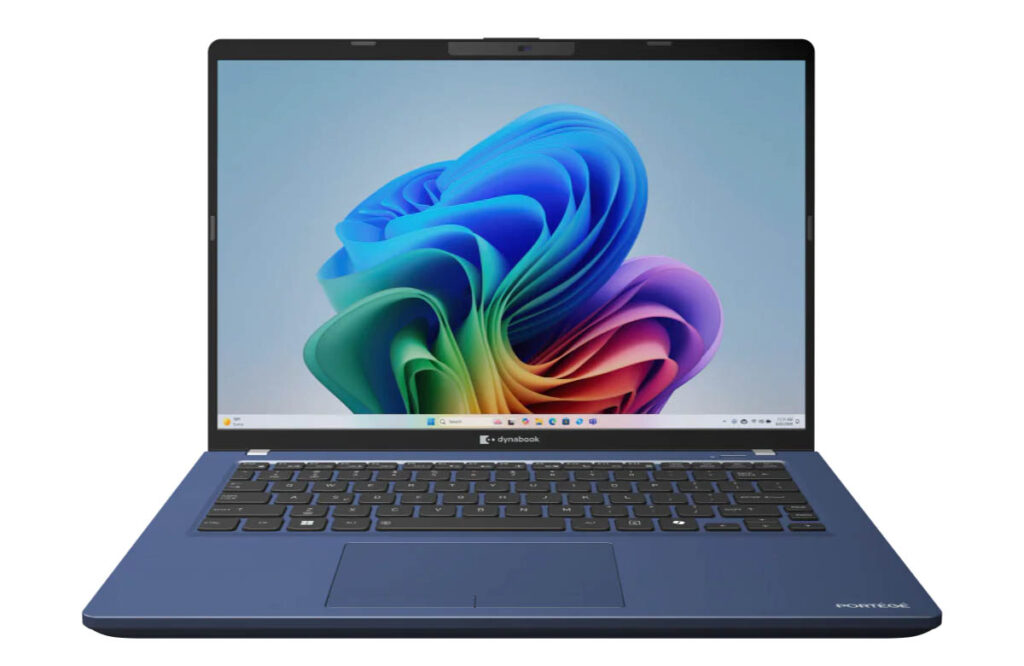
The Dynabook Portégé Z40L-N is the complete opposite. It isn’t trying to win any modern beauty pageants, and with its traditional dark blue aesthetic and noticeable display bezels, it looks like a standard piece of corporate issue. But for professionals who practically live out of a suitcase, this machine is a dream. It weighs a jaw-dropping 959 grams – so light that you might genuinely check your bag to make sure you didn’t leave it behind at airport security.
Out of the Box: A Closer Look
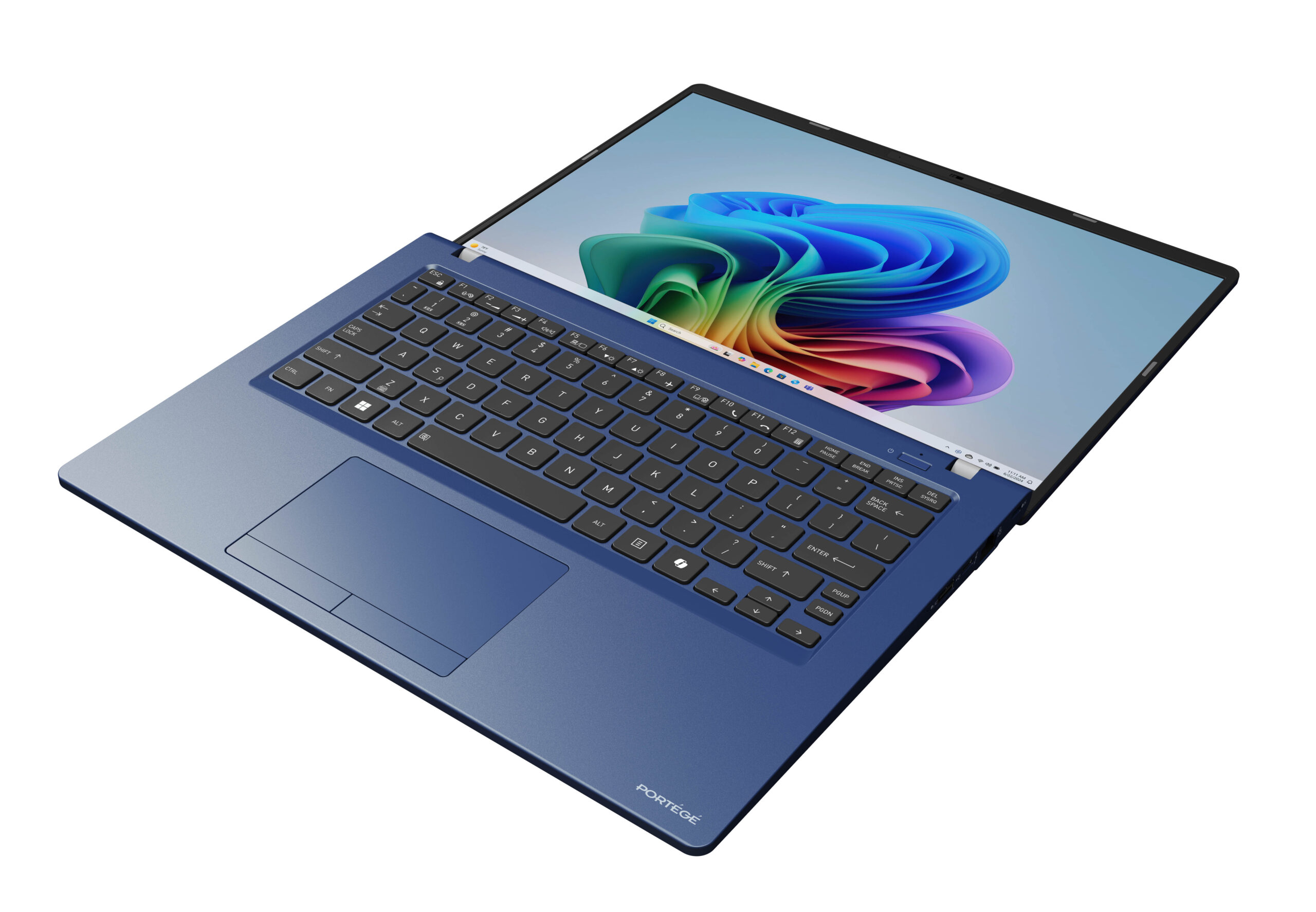
When you unbox the Z40L-N, the first surprise is just how little it weighs. It uses a matte-finish magnesium alloy chassis that passes strict MIL-STD-810H drop and environmental testing. Because it’s so light, the shell can feel deceptively thin at first touch, but the keyboard deck is remarkably solid with very little flex.
The typing experience is comfortable, featuring a backlit, spill-resistant layout with raised keys that offer great tactile response. However, if you’re used to standard consumer keyboards, you’ll need to watch out for the tiny auxiliary keys tightly squeezed into the right side of the layout.
The navigation is another area that proudly throws back to classic corporate notebooks. The trackpad tracks smoothly, but the pad itself doesn’t depress or click. Instead, Dynabook placed two physical mechanical buttons right underneath it. It takes an hour or two to get used to if you’re coming from a modern haptic pad, but it’s incredibly precise once you adapt.
Connectivity: What Ports and Connectivity Does the Dynabook Z40L-N Have?
The Dynabook Portégé Z40L-N eliminates peripheral adapters by integrating seven full-sized physical I/O ports directly into its sub-1kg frame. This array includes dedicated HDMI, dual Thunderbolt 4 USB-C ports, dual USB 3.2 Type-A slots, a microSD card reader, and a drop-jaw RJ-45 Gigabit Ethernet port.
This native port layout allows enterprise users to connect simultaneously to secure wired corporate networks, legacy conferencing projectors, and external storage drives without deploying external hardware dongles or expansion hubs.
Right Side I/O: 1x RJ-45 Ethernet LAN port, 1x USB 3.2 Gen 1 Type-A (with Sleep & Charge functionality), 1x microSD Card Slot, 1x Security Lock Slot.
Left Side I/O: 1x HDMI, 2x USB-C / Thunderbolt 4 (supporting power delivery), 1x USB 3.2 Gen 1 Type-A, 1x Headset combo jack.
Screen and Real-World Performance
The display is a 14-inch WUXGA (1920×1200) anti-glare screen with a vertical-friendly 16:10 aspect ratio. It pushes around 400 nits of brightness, which makes text look perfectly crisp even under terrible, harsh office fluorescent lighting. That said, this is a screen meant for spreadsheets, databases, and writing – not for professional photo or video editing. It handles web graphics beautifully, but it lacks the wide color accuracy required for creative studios.
Performance is snappy and incredibly efficient, thanks to the Intel Core Ultra Series 2 chips (our review unit came with the Ultra 7 258V and 32GB of RAM). Because it uses an embedded Neural Processing Unit (NPU), on-device AI tasks – like Windows Studio Effects for blurring your background or auto-framing your webcam during video calls – run locally on the silicon without tanking your CPU or destroying your battery life.
The smart security features are excellent for privacy-minded professionals. Using its built-in sensors, the laptop can automatically dim the screen if you look away, lock itself the moment you walk away, and wake up instantly when you sit back down. The only performance caveat is that this is an ultralight travel machine, not a heavy rendering workstation. If you try to push heavy, sustained multi-core video rendering loops, the compact internal cooling system will scale back performance to keep the thin chassis from running hot.
What are the Security Features on the Portégé Z40L-N?
The Portégé Z40L-N adheres to Microsoft Secured-core PC compliance, integrating a dedicated discrete TPM 2.0 module, physical webcam privacy shutter, and biometric authentication. Its sensor suite utilizes automated human presence detection to secure data locally based on user proximity.
- Proximity-Based Biometrics: The built-in infrared (IR) camera automatically dims the screen when the operator looks away, locks the OS upon physical departure, and initiates an instant biometric login via face or fingerprint recognition upon return.
The TCO Winner: A Battery You Can Actually Replace
For IT managers and deployment leads, the biggest reason to look closely at the Z40L-N has nothing to do with AI benchmarks – it’s about the long-term total cost of ownership (TCO). The Dynabook Portégé Z40L-N features a user-replaceable 56Wh battery that optimizes long-term Total Cost of Ownership (TCO) for IT departments. By allowing internal helpdesks to swap degraded cells using standard tools rather than industrial adhesives, the laptop extends hardware lifecycles and minimizes electronic waste.
In a massive win for sustainability and hardware lifecycles, the 56Wh battery is user-replaceable. If an executive’s battery starts losing capacity after three or four years of constant airport rapid-charging, your internal helpdesk can swap the battery out in ten minutes using standard tools. There’s no dangerous industrial glue to fight through and no need to throw away a perfectly good motherboard. Combined with a standard 3-Year Limited Warranty (expandable to 4 years via +Care Service), it’s a highly predictable asset for a corporate fleet.
The Verdict: The Top 5 Best Things About It
The Dynabook Portégé Z40L-N isn’t designed to be a flashy trendsetter. It’s a laser-focused, secure, and incredibly lightweight tool for people who travel for a living. If your priorities align with enterprise durability and zero-compromise connectivity, it’s a brilliant investment.
Here are the five best things about it:
- True Sub-1kg Portability: At just 959 grams, it takes all the strain out of travel while maintaining a drop-tested magnesium build that survives real-world abuse.
- No-Dongle I/O Array: It completely eliminates the “adapter tax” by keeping native HDMI, two USB-A ports, and a physical Ethernet jack right on the chassis.
- Cutting-Edge Wi-Fi 7: It includes internal 802.11be hardware, ensuring ultra-stable wireless connections and top-tier speeds on modern enterprise networks.
- Local NPU Security and Privacy: It uses on-device AI to run clever biometric protections – like automatic locking when you walk away – without hurting system performance.
- Easily Serviceable Power Cell: The battery can be quickly unbolted and replaced by tech support, extending the laptop’s workspace life and drastically reducing electronic waste.
| Specification Component | Details & Configurable Options |
| Operating System | Windows 11 Pro |
| Processor Options | Intel® Core™ Ultra (Series 2): • Intel® Core™ Ultra 5 226V • Intel® Core™ Ultra 5 236V (vPro) • Intel® Core™ Ultra 7 258V • Intel® Core™ Ultra 7 268V (vPro) |
| Memory (RAM) | • 16 GB LPDDR5 (for Core Ultra 5 configurations) • 32 GB LPDDR5 (for Core Ultra 7 configurations) |
| Graphics | • Intel® Arc™ 130V Graphics (with Core Ultra 5) • Intel® Arc™ 140V Graphics (with Core Ultra 7) |
| Display | 14.0” WUXGA ($1920 \times 1200$) resolution, 16:10 aspect ratio (Touch screen optional) |
| Storage | PCIe NVMe SSD up to 2 TB |
| Wireless & Networking | Intel® Wi-Fi 7 (6 GHz, 802.11be), Bluetooth™, and Intel® Ethernet Connection i219 |
| Camera & Sensors | 5 MP Webcam + IR Camera with Privacy Shutter, featuring Human Presence Detection |
| Audio | Dual-Microphone Array with Stereo Speakers featuring Dolby Atmos |
| Physical I/O Ports | •1x HDMI® • 2x USB-C / Thunderbolt 4 • 2x USB 3.2 Gen 1 Type-A (One with USB Sleep & Charge) • 1x RJ-45 Ethernet LAN port • 1x Headset combo jack • 1x microSD™ Card Slot |
| Security Hardware | dTPM 2.0, Microsoft Secured-core PC compliance, Fingerprint Reader, and a Security Lock Slot |
| Input Infrastructure | Premium raised-tile, spill-resistant, backlit keyboard paired with a ClickPad pointing device |
| Power Capacity | 56 Wh Battery (User-replaceable) |
| Chassis & Build | Magnesium alloy chassis in Dark Tech Blue Metallic, designed to pass MIL-STD-810H methodologies |
| Dimensions & Weight | • Size: 312.4 x 222.5 x 18.9$ mm • Weight: Starting at 959g (2.11 lbs) |
| Standard Warranty | 3-Year Standard Limited Warranty (Up to 4 years available via +Care Service®) |