How to Repair Corrupt Exchange Databases Safely and Minimize Downtime
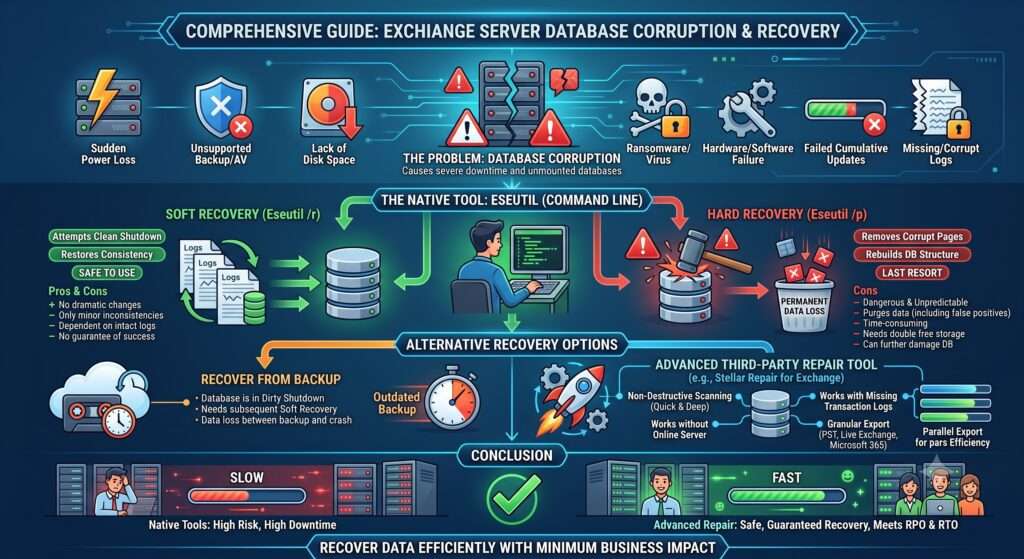
Corruption in the Exchange Server database is a serious situation, which can result in unmounted database, blocked email flow, and considerable downtime. In this article, we will be talking about what’s at risk in such a situation, limitations of the native recovery tools, and alternative solutions to recover data in such a situation at the earliest possible time and with the least possible impact on the business and the operations of the company.
What could Damage an Exchange Server Database?
There are various things that could damage an Exchange database – a disaster or small things. Here are the most common factors and culprits:
- Sudden loss of power on the server.
- Unsupported backup or antivirus software.
- Lack of disk space.
- Ransomware or virus attacks.
- Hardware/software failure.
- Failed or interrupted Cumulative Updates (CU) on the server.
- Missing, corrupt, or locked log file
What is ESEUtil and What does it do?
ESEUtil (Extensible Storage Engine Utility) – the native tool available in the Exchange Server – is the command line tool that is used for repairing the databases. The tool works directly on the database engine level and has two options when it comes to recovery. Apart from this, you can use the ESEUtil command line for other functions, such as integrity checks, offline defragmentation, log file inspection, checksum verification, and others. As for repair, the tool has two features – soft recovery and hard recovery.
Soft Recovery
This is the initial database recovery as it doesn’t make drastic changes to the database and it is safe to use. The option (Eseutil /r) will try to replay the transaction logs with the intention to bring the database to Clean Shutdown state. The goal of this process is to restore the consistency of database without touching the database.
Some of the limitations of soft recovery are:
- It will only be able to fix small inconsistencies of the database.
- It’s dependent on the transaction log files to be intact and available.
- If the transaction logs are damaged or not available, the database recovery process will fail.
- There is no guarantee that that this process would bring the database to clean status.
Hard Recovery
This option must be used as the last resort for recovery of the database as it deletes data from the database. It is the most dangerous method and unpredictable as the process causes permanent data loss to the database. Before running the option (Eseutil /p), there are some things you need to do:
- Have a backup of the current database.
- Ensure there is ample storage (the size of the database).
As soon as you run this option, it will prompt you to accept data loss. The process will,
- Remove any corrupted pages in the database.
- Discard any unrepairable data.
- Rebuilds the database structure.
As you can see, the process is pretty destructive. Apart from damaged items, any items which are deemed corrupted will be purged from the database, even the false positives. Another aspect of this you should consider is that there is no guarantee of success and it can further damage your database. There is also the element of time and storage as the process will take a considerably amount of time and would require double the free storage.
Alternative Options to Recover Exchange Database
If soft recovery was not successful and you would have to perform hard recovery and still no success, you can use the following options to recover your corrupt Exchange database.
Recover from Backup
There is the option to recover from backup. Depending on when the backup was taken and the time of the issue, you will lose all the changes. After the database recovery from backup, you would still need to use ESEUtil and run a soft recovery as the database would be in Dirty Shutdown state.
Use a Third-Party Exchange Repair Tool
When the recovery process is too risky, there is time constraint, or the ESEUtil has failed, then you can use third-party Exchange recovery software, such as Stellar Repair for Exchange. This tool has a much better recovery approach, is reliable and non-destructive, and can reduce the recovery time to a minimum.
With this tool, without having an online Exchange Server, you can open databases of any size, from any Exchange Server version and in any state. After a quick or deep scan, you will see the entire structure of the database. You can granularly export user mailboxes, user archives, shared mailboxes, disabled mailboxes, and public folders to PST file and other file formats.
You can also export directly to a new Exchange Server database or Microsoft 365 (Exchange Online) with minimal effort and with features such as automatic mailbox matching, priority and parallel exports.
Using Stellar Repair for Exchange is much safer than ESEUtil as it doesn’t need the Exchange Server to operate, doesn’t alter or discard the original database or transaction logs, works even when transaction logs are missing, supports large databases, and provides preview of the recoverable items.
Conclusion
Above, we have seen how ESEUtil command can be used to recover corrupt database and the challenges that you might face when using the command. This is why simpler and guaranteed restore and recovery options should be used to guarantee the recovery process and ensure that the recovery point objective and recovery time objective are observed. One of the best options is to use an Exchange repair tool, such as Stellar Repair for Exchange. This tool can recover mailboxes and all other items from corrupted Exchange database within minimum time and without any data loss.