The Best React Data Grids for Developer Efficiency

The Right React Data Grid Can Make or Break App Performance
by Deyan Kamburov, Development Team Lead, Infragistics
What’s the best React data grid available today? From Ignite UI for React to Kendo UI, the market is full of powerful grid solutions. But not all of them deliver. Imagine you’re building a financial portfolio app. It is expected to display tons of data in a matter of milliseconds without slowdowns and performance hiccups. Add features like data selection, Excel-style filtering, pinning, templating, and more, and the task quickly escalates from “pick a grid” into “pick an architecture.”
In this article we describe the top 10 React data grids, to help you avoid challenges along the way. By comparing and contrasting them, you will be able to gain a better understanding of the leading React UI libraries and grids and choose the one that is the best option for you and your projects.
Let’s explore these grids and everything they pack.
The Best React Data Grid: The Ultimate List
Let’s face it. The truth is, the best React Grid isn’t just the one with the most affordable licensing. It’s actually the one that ensures high performance, is easy to maintain, integrates seamlessly with your existing tech stack, provides flexibility and various features, reinforces developer freedom, and serves as a productivity boost.
Here’s our top selection.
- Ignite UI for React
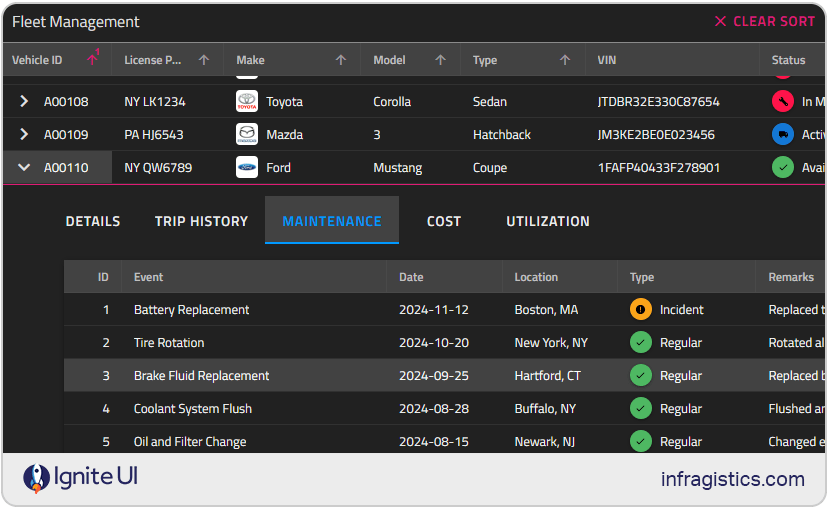
In general, Ignite UI for React is the most comprehensive UI library of modular React components. It encompasses blazing fast grid controls, a complete Microsoft Excel solution, 60+ React charts and graphs, and a lot more. When it comes to data grids, Ignite UI for React data grid tops the chart because the React data grid component is specifically designed with developers in mind.
It not only delivers performance and scalability but also includes everything from basic to advanced features. The most critical include data selection, Excel-style filtering, sorting, paging, grouping, templating, column moving, column pinning, exporting to Excel and CSV formats, state persistence, keyboard navigation, and more.
Key advantages:
- High-performance rendering optimized for large data volumes, familiar Excel-like experience, and optimal file size.
- Seamless integration with various data sources.
- Ability to handle large datasets or applications that require real-time updates efficiently.
- Advanced features like editing, advanced filtering, collapsible column groups, row UI actions, multi-row layout, state persistence, virtualization, keyboard navigation, Master-detail grid, and more.
- Continuous release schedule, shipping the latest updates.
- Seamless integration with real-time data sources.
- 24×5 enterprise-grade assistance to reduce technical roadblocks.
- Comprehensive documentation and good community support.
- Ability to use low-code App Builder (as part of the Ultimate package).
- Demos, code examples, and customizable React samples for a head start.
- Offers an all-in-one enterprise toolkit with top-tier UX and support, transparent and cost-efficient pricing models.
Best use cases:
An ideal choice for enterprise-grade React apps that require real-time data updates, complex data visualization, or large dataset management. Perfect for data-heavy financial dashboards, analytics platforms, and business intelligence tools where performance and scalability are key.
- AG Grid
Frequently used grids by React developers, it brings hundreds of features, such as sorting, filtering, grouping, pivoting, Excel export, live updates, and many others.
Key advantages:
- Industry gold standard for large-scale, high-performance apps with enterprise-grade features.
- Highly customizable with themes, cell renderers, and rich APIs.
- Quick setup and relatively easy to use.
- Dedicated support, frequent releases, and detailed documentation.
- Dedicated Framework GUI Support.
- AG Grid and AG Grid-Enterprise are open source – AG Grid is free, AG Grid Enterprise requires a license.
Best use cases:
Ideal for enterprise apps with heavy data needs. It’s best for large-scale projects and enterprise-grade applications needing scalability and advanced functionality.
- Kendo UI
Kendo UI is the primary choice for developers looking for a sleek, pre-styled grid with consistent UI across frameworks. One of the best aspects which makes it a reliable solution is the fact that it is backed by a trusted vendor. The grid also offers seamless integration, easy theming, a strong feature set (including grouping, export, and editing), and good documentation.
Key advantages:
- It can easily display and handle large datasets.
- There’s a free feature set, including resizing of columns, reordering of columns and rows, auto-resizing, in-cell editing, CVS export, and more.
- Seamless integration with charts, forms, and other KendoReact components.
- Carefully setting the PropTypes in each component to make things easier.
- The speed depends entirely on the React framework, the browser, and the machine the dev uses.
- Continuous delivery cycle, enabling React developers to take advantage of all the bug fixes and updates.
Best use cases:
Great for React developers who want to build high-performance apps with minimal custom coding. Works well for data management apps, admin dashboards, and enterprise tools.
- DevExtreme
DevExtreme React Grid is another great choice we’ve added to the best React data grid list because it challenges its competitors with its speed and feature set. It comes with an integrated server-side support for data filtering, Excel export, flexible data shaping, paging, sorting, record grouping, and summary computations.
Key advantages:
- Features like grouping, summaries, filtering, sorting, paging, etc.
- Full support for theming, responsive layout, and inline editing.
- Built-in exporting to Excel, keyboard navigation, and column resizing.
- Strong documentation and integration with DevExtreme’s full component suite.
- Frequent updates and a stable development roadmap.
Best use cases:
Best suited for applications that are already utilizing the DevExtreme ecosystem or require chart and grid integration. It is designed for enterprise developers who prioritize polished UI and data shaping.
- Syncfusion
Known for its flexibility among development communities, this React data grid offers a balance between functionality and performance. Built for enterprise apps, Syncfusion React data grid supports simple table views, complex pivoting, and various data manipulation scenarios.
Key advantages:
- Sufficient feature set: editing, sorting, filtering, scrolling, searching, hierarchical binding, exporting to PDF and Excel, grouping, and more.
- Mobile-first design that adapts to any resolution.
- Dedicated support, extensive documentation, and a good pricing model.
- Provides a free community license that’s great for small teams or startups.
Best use cases:
Benefits teams that seek a feature-rich grid with great licensing options for startups.
- MUI X Grid
This is a TypeScript-based React control that displays information in a structured format of rows and columns.
Key advantages:
- Familiar API, great styling consistency, Excel export, Tree data (Pro/Premium).
- It comes with features like virtualization, pinning, ordering, editing, sorting, filtering, pagination, and more.
- Clean and intuitive API for implementing complex use cases.
- Best-in-class grid for teams standardizing on the MUI design system.
- The Data Grid is open-core. The community version is MIT-licensed and free.
Best use cases:
MUI X Grid for React is best for developers already using MUI who need seamless grid integration into Material Design apps.
- MESCIUS/Wijmo FlexGrid (React)
The FlexGrid is considered a fast and flexible data grid option. The grid module includes all of the most common features, extensions, and a flexible API to customize to grid even more.
Key advantages:
- Fast and compact, supports Excel-like editing, grouping, and chart integration.
- Fast grid, minimal setup, and features that make it ideal for smaller apps.
- With support for sorting, filtering, grouping, and editing.
- Minimal dependencies and easy to embed in existing projects.
- Flexible licensing options and comprehensive help docs.
Best use cases:
When teams need speed + Excel parity in a compact package with reliable docs and licensing.
- SVAR Grid
We’ve added this one to the list because it is a simple yet very efficient grid option. Its advantages include a built-in context menu, tree data, frozen columns, and more.
Key advantages:
- Easy setup, inline editing, Excel export, solid performance for small datasets.
- With a clean UI and a decent feature set, packing intuitive in-cell editing, and an easy-to-use context menu.
- Seamless incorporation and visualization of hierarchical data within the table.
- Smooth performance on small to medium datasets.
Best use cases:
Developers use it primarily for internal tools or apps with basic grid needs, but with commercial licensing requirements. Plus, it’s a great alternative for teams with tight budgets or those needing support and licensing over open-source solutions. The grid’s simple, clean UI and good performance are ideal for small/medium data.
- TanStack Table (formerly React Table)
The @tanstack/react-table adapter is a wrapper around the core table logic. The main idea here is to state the “React” way, providing types and the rendering implementation of cell/header/footer templates.
Key advantages:
- Lightweight and dependency-free with a modular architecture.
- Flexible, framework-agnostic, supports virtualization and custom logic.
Best use cases:
TanStack Table is the go-to choice for building custom UIs on top of raw data logic, providing full control over rendering and behavior. Ideal for developers who want complete control and a headless architecture.
- dhtmlxGrid
dhtmlxGrid is a robust and flexible React data table control that is part of the advanced Suite UI library.
Key advantages:
- Delivering Tree view, filtering, Excel export, stable performance.
- Mature, proven solution with robust business-oriented features, ensuring stable performance.
- Smooth visual customization.
- API-first design makes integration straightforward.
Best use cases:
Its traditional approach and stable performance make it ideal for legacy systems or internal business tools. Best for legacy apps or enterprise systems that require traditional grid behavior.
What to Look for in a React Grid
When choosing the best React data grid, it’s crucial to find one that can handle large data volumes, complex structures, and dynamic user interfaces. Here are the key factors to keep in mind:
- Features for rich data interaction: filtering, sorting, grouping, inline editing with real-time updates, resizing, reordering, and pinning.
- Optimizations for performance, scalability, and better rendering: virtual scrolling, lazy loading, paging, and more.
- Advanced capabilities for easily handling visualizations: exporting options, batch editing, advanced filtering, state persistence, virtualization, custom aggregation functions, and multi-column sorting.
- Integration and compatibility: support for REST APIs, real-time data sources, and so forth.
- Grids for every scenario: for hierarchical tabular data, Pivot Grid, Tree Grid, and others.
- Options for customization and theming: advanced UI customization, support for pre-installed themes (Material, Bootstrap, etc.) and custom themes.
Ultimately, the right React Data Grid must balance performance and extensibility. It should support virtualization for large data volumes, provide asynchronous data handling, and integrate seamlessly with your existing architecture. Whether you’re implementing basic grid interactions or advanced analytics, the grid’s scalability and rendering efficiency will define its long-term value. From simple features like scrolling and paging to more advanced ones like tree grid structures and data analysis, the best React Grid component should have it all.
About Deyan Kamburov, Development Team Lead, Infragistics

As a Team Lead at Infragistics, Deyan Kamburov plays a pivotal role in steering his team towards excellence in software engineering. He and his team are actively involved in App Builder and Ignite UI components for various platforms. Throughout his time at Infragistics, which spans over a decade, Deyan has been responsible for testing, automation, writing and reviewing code, documentation, mentoring and guiding co-workers. Deyan earned both his Bachelor’s and Master’s Degrees in Computer Science and Software Technologies from the prestigious University of Sofia.